

Legend of Defenders cheat table. Developer by KaiPlay Studio,
Publisher by Gamersky Games.
Game Description: A castle-defense idler for Windows in which monster waves keep getting tougher, battles resolve on their own, and the strategy sits in your upgrade choices.
Scanning the castle economy
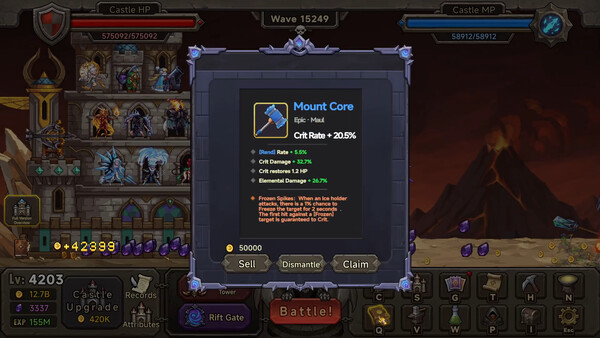
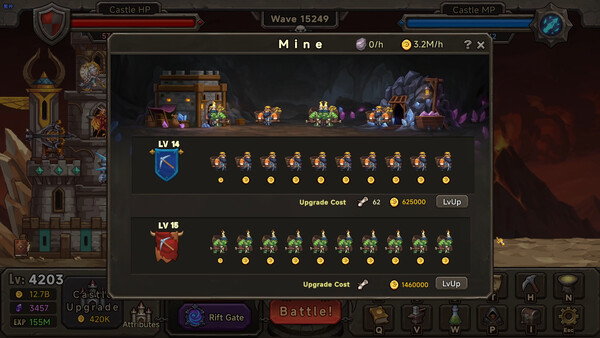
Cheat Engine suits Legend of Defenders because its whole economy sits in a handful of visible numbers. The store page names gold, XP and talent points as the upgrade resources, and the screenshots add a Castle HP bar, a Castle MP bar and a mine with an hourly gold rate. A table for this kind of game would normally go after those figures: a gold or talent point editor, a Castle HP lock, and possibly a damage multiplier for the later waves.
Expect big numbers. Idle games often keep currency in Float or Double values rather than plain 4-byte integers, and the screenshots abbreviate totals as 12.7B and 155M, which will not match the stored value exactly. Start with an unknown initial value scan, earn or spend some gold, then filter by increased or decreased value until the list gets short.
Solo play and the lack of any in-app purchases mean there is usually no server copy of these values to fight with. Table addresses do tend to shift when a game gets patched, though, so an entry that stops responding after an update needs a fresh scan rather than repeated ticking.
How to use Legend of Defenders Cheat Table?
- Copy your save before anything else, and consider pausing Steam Cloud for the game in its Steam properties while you experiment.
- Install Cheat Engine, start Legend of Defenders and load your castle so the resource values are actually in memory.
- Open the .CT file in Cheat Engine, click the computer icon in the top-left corner and pick the game’s process from the list.
- Tick one entry at a time and change values in small steps. Jumping straight to billions of gold drains the upgrade loop of any purpose.
- Exit the game normally, relaunch it and check that the change held. If something looks off, restore the backup from step one.


Specs, achievements and languages
Legend of Defenders runs on 64-bit Windows only. At minimum it wants Windows 10 version 21H1 or newer, an Intel Core i3 or AMD equivalent, 8 GB of RAM, a DirectX 11 card with 1 GB of VRAM and 1 GB of free space, while the recommended spec moves up to an Intel Core i5, 16 GB of RAM and a GeForce GTX 1060 or Radeon RX 580. The game carries 153 Steam achievements, supports Steam Cloud and Family Sharing, can be played with the mouse alone, and is available in English, Simplified Chinese, Traditional Chinese, Japanese and Korean. Its standard price is $14.00 USD, and its Steam release date is November 2, 2026.
Illustrative diagram of the Cheat Engine workflow. Cheat tables are for single-player / offline use only.
Legend of Defenders Trainer
Looking for a Legend of Defenders trainer? A cheat table does the same job. Load the .CT file in Cheat Engine to enable single-player cheats — god mode, unlimited health, resources and more — exactly like a standalone Legend of Defenders trainer. No separate .exe trainer is needed; the Legend of Defenders cheat table provides the same options for the PC version. Use it in single-player / offline only.
Legend of Defenders Cheat Table — FAQ
Is the Legend of Defenders cheat table safe?
Cheat Engine and its tables edit game memory locally and are widely used for single-player games. Antivirus tools may show a false positive because memory-editing resembles what some malware does — this is expected. Only download from sources you trust, and use tables in single-player / offline play.
How do I load a .CT file in Cheat Engine?
Open Cheat Engine, click the folder/open-table icon, select the downloaded .CT file, then attach it to the Legend of Defenders process. Tick the cheats you want and use the listed hotkeys in-game.
Does the Legend of Defenders cheat table work on the latest version?
Cheat tables target a specific game build, so a big patch can break some options until the table is updated. Check the "Updated" date in the file information, and back up your saves before use.
Will I get banned for using it?
Use cheat tables in single-player / offline only. Do not use them in online or multiplayer modes — that can violate a game’s terms and lead to a ban.