

Leaf it Alone cheat table. Developer by Eternity,
Publisher by Eternity.
Game Description: A first-person cleanup sim in which you reclaim a neglected property area by area, using the leaf blower, the rake or simply your hand. Clearing zones unlocks extras, crouching and greenhouse access among them.
What to Scan For in Leaf it Alone
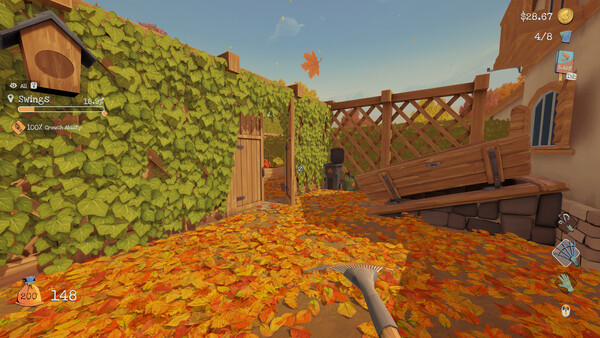
The HUD does half the work for you. One of the official screenshots, taken in the Swings area, shows $28.67 at the upper right, so the balance carries cents. Values like that are commonly kept as Float or Double, which makes those the first types to try; if neither narrows down, scan 4 Bytes for the amount in cents instead (2867 in that example). Once the balance is pinned down, freezing it or setting a fixed amount is the usual way tables handle cash.
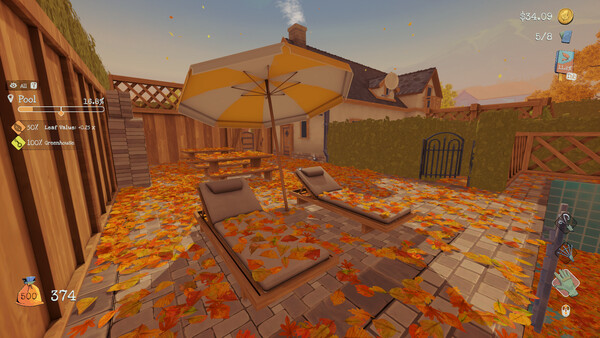
The leaf bag in the lower-left corner gives you two more targets. In that same screenshot the bag reads 200 and the counter beside it shows 148, both whole numbers that tend to sit in plain 4-byte integers and respond well to exact-value scans as the count changes. Fuzzier values, like an area’s completion percentage or the leaves-per-second figure (3.4/s in one of the pool screenshots), are easier to catch with an Unknown initial value scan followed by Increased and Decreased passes. Plain addresses rarely survive a restart, so anything you want to keep needs a pointer scan or an AOB script.
Leaf it Alone is single-player, with nothing on its store page about in-app purchases or an outside account, so the values you find are usually the ones the game actually uses rather than copies of server data. Steam Leaderboards are the exception: any value you change can end up shaping a score the game submits there.
How to use Leaf it Alone Cheat Table?
- Install Cheat Engine, then launch Leaf it Alone from your Steam library.
- Load a save where you already have some money and a partly filled bag, so those values are live in memory.
- Click the computer icon in Cheat Engine and attach to the Leaf it Alone process.
- Load a .CT table you have built yourself, or add the addresses you found to the address list, then tick the checkbox beside each entry you want active.
- Copy your save folder to a safe spot before you keep any edit, so you can roll back if a value breaks something.

Specs, Languages and Achievements
Leaf it Alone runs on Windows only. Steam’s minimum spec is Windows 10, an Intel Core i3-8100 or AMD Ryzen 3 1200, 4 GB RAM, a GeForce GTX 960, plus 2 GB of storage, and no recommended tier is listed. The game carries 54 Steam achievements, among them Novice Investor and Seal the Deal, along with Steam Cloud, Stats, Leaderboards, Family Sharing and full gamepad support, Sony’s DualShock and DualSense included. Language support covers 13 languages, from English, French and German to Japanese, Korean and both Simplified and Traditional Chinese, and single-player is the only mode on the listing.
Illustrative diagram of the Cheat Engine workflow. Cheat tables are for single-player / offline use only.
Leaf it Alone Trainer
Looking for a Leaf it Alone trainer? A cheat table does the same job. Load the .CT file in Cheat Engine to enable single-player cheats — god mode, unlimited health, resources and more — exactly like a standalone Leaf it Alone trainer. No separate .exe trainer is needed; the Leaf it Alone cheat table provides the same options for the PC version. Use it in single-player / offline only.
Leaf it Alone Cheat Table — FAQ
Is the Leaf it Alone cheat table safe?
Cheat Engine and its tables edit game memory locally and are widely used for single-player games. Antivirus tools may show a false positive because memory-editing resembles what some malware does — this is expected. Only download from sources you trust, and use tables in single-player / offline play.
How do I load a .CT file in Cheat Engine?
Open Cheat Engine, click the folder/open-table icon, select the downloaded .CT file, then attach it to the Leaf it Alone process. Tick the cheats you want and use the listed hotkeys in-game.
Does the Leaf it Alone cheat table work on the latest version?
Cheat tables target a specific game build, so a big patch can break some options until the table is updated. Check the "Updated" date in the file information, and back up your saves before use.
Will I get banned for using it?
Use cheat tables in single-player / offline only. Do not use them in online or multiplayer modes — that can violate a game’s terms and lead to a ban.